“Your package is being held at customs. Pay a small duty to release it.” You probably get a few of these in any given month. This post takes apart one version of the trick, aimed at Colombians and impersonating the country’s national postal service, 4-72. Most phishing sites you actually run into are crude, and the ones imitating a government service are usually the crudest of all. This one is not. And the trouble starts after you enter your card: there is not just an automated script at the other end, there is a live person waiting.
On the evening of Saturday 15 August (UTC), someone used my URL shortener tg.pe on a link. Anyone can, without an account. The destination was paquetes-colombia.blog.
Note: There is also a Mandarin version of this post. 台灣朋友歡迎左轉 中文版。
A brand-new domain dressed as a government site
First, consider how new it was. RDAP, the public record of who registered a domain and when, puts registration at 16:59 UTC on 15 August, and the link reached tg.pe three hours later. tg.pe puts links to a domain this new into a honeypot by default: the submitter is told it worked, the link does redirect normally for a short window, and then it self-destructs within minutes and returns nothing but 404s. I covered the logic of distrusting new domains in the previous post, and will not repeat it here.
Sweeping my own doorstep is the bare minimum. The domain was still live, and copies of the link would keep spreading by SMS and email, so I did what I always do and opened it by hand. What I found was much more elaborate than the one-page fake login from last time.
It is a whole kit, impersonating 4-72 down to the layout and the fonts: the banner of GOV.CO, Colombia’s government web portal, runs across the top, and the footer copies 4-72’s tax number. The laziest part is the images: the favicon (the little browser-tab icon) and the GOV.CO banner graphic are both hotlinked straight from 4-72’s own servers. That shortcut has a price. The hostname of every front in this campaign is sitting in 4-72’s own access logs, with a referrer, in near real time. The impersonated brand is holding a ready-made list of the sites impersonating it, and almost nobody monitors for it.
The whole thing sits behind Cloudflare, acting as a reverse proxy in front of the real server, and the protection level was turned up far enough to throw a challenge page. That was a setting the operators switched on in their own Cloudflare account, and the effect was that every scanner judging the page by fetching it got nothing but “prove you are not a robot”. urlscan’s score for the domain came back 0. But “they were all blinded” would not be accurate: urlscan’s own machine-learning engine still called it malicious, at 96, and by the time the link reached tg.pe VirusTotal had one engine calling it malicious and one calling it suspicious. Those verdicts cannot have come from the page, because the wall was in the way. What they were reading instead, the vendors do not say.
The six-dollar calculation
Whatever tracking number you type, as long as it is long enough to pass, the page comes back with the same line: your package is “Retenido en aduana” (held at customs), and a duty is owed.
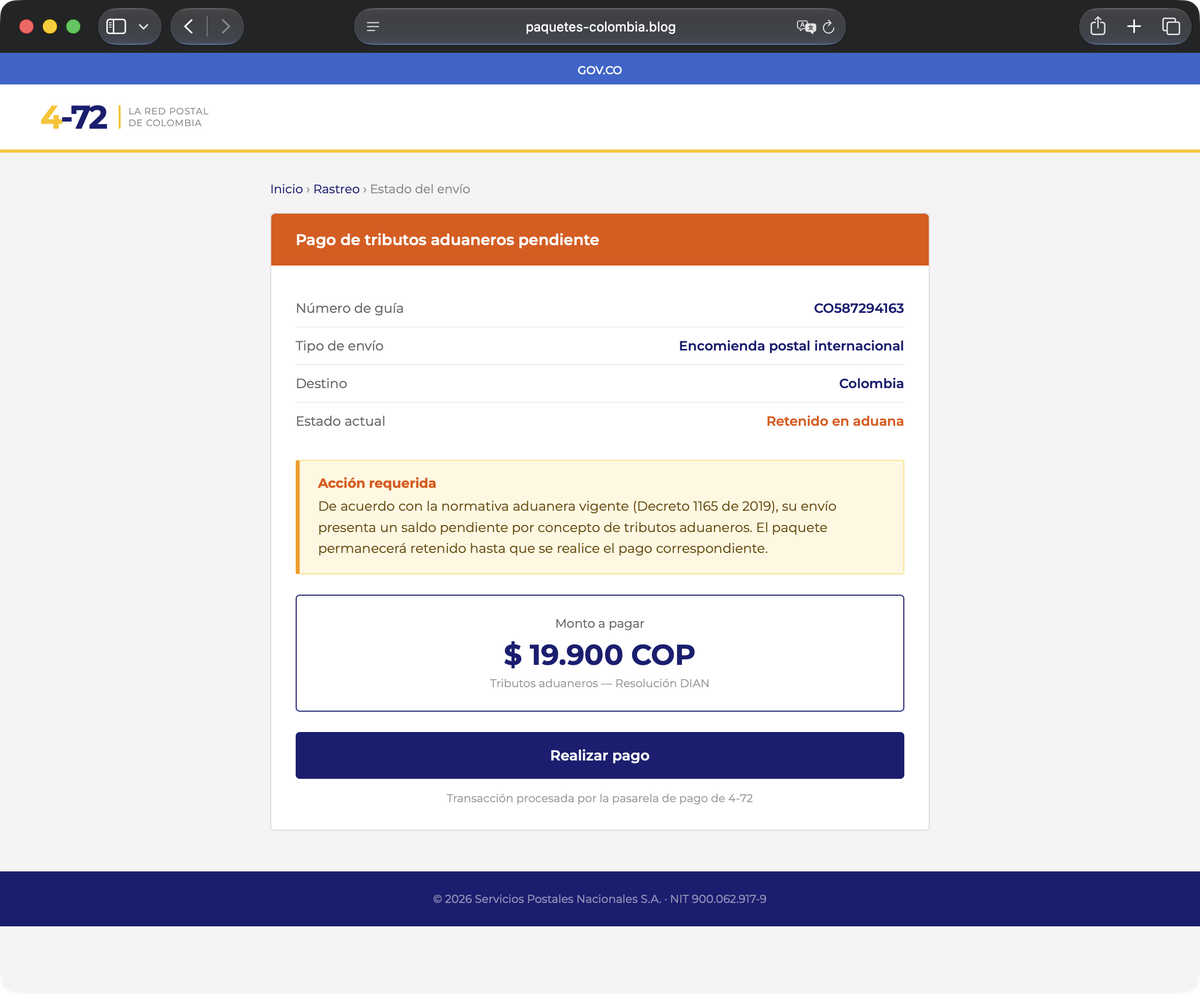 The fake customs page: the amount is only 19,900 pesos, and the demand is dressed up with Colombia’s real customs statute, plus a fake resolution from DIAN, the country’s tax and customs authority, for weight.
19,900 Colombian pesos is about six US dollars: small enough that you would not stop to call the post office, and squarely in the range where people think “fine, I’ll just pay it”. Add a real statute and a real government agency and it feels thoroughly official. But the six dollars is only the entry fee. The next page is what they are after.
A payment form that asks for orders every three seconds
Press “pay” and a form appears: cardholder name, card number, expiry, CVV (the code on the back of the card).
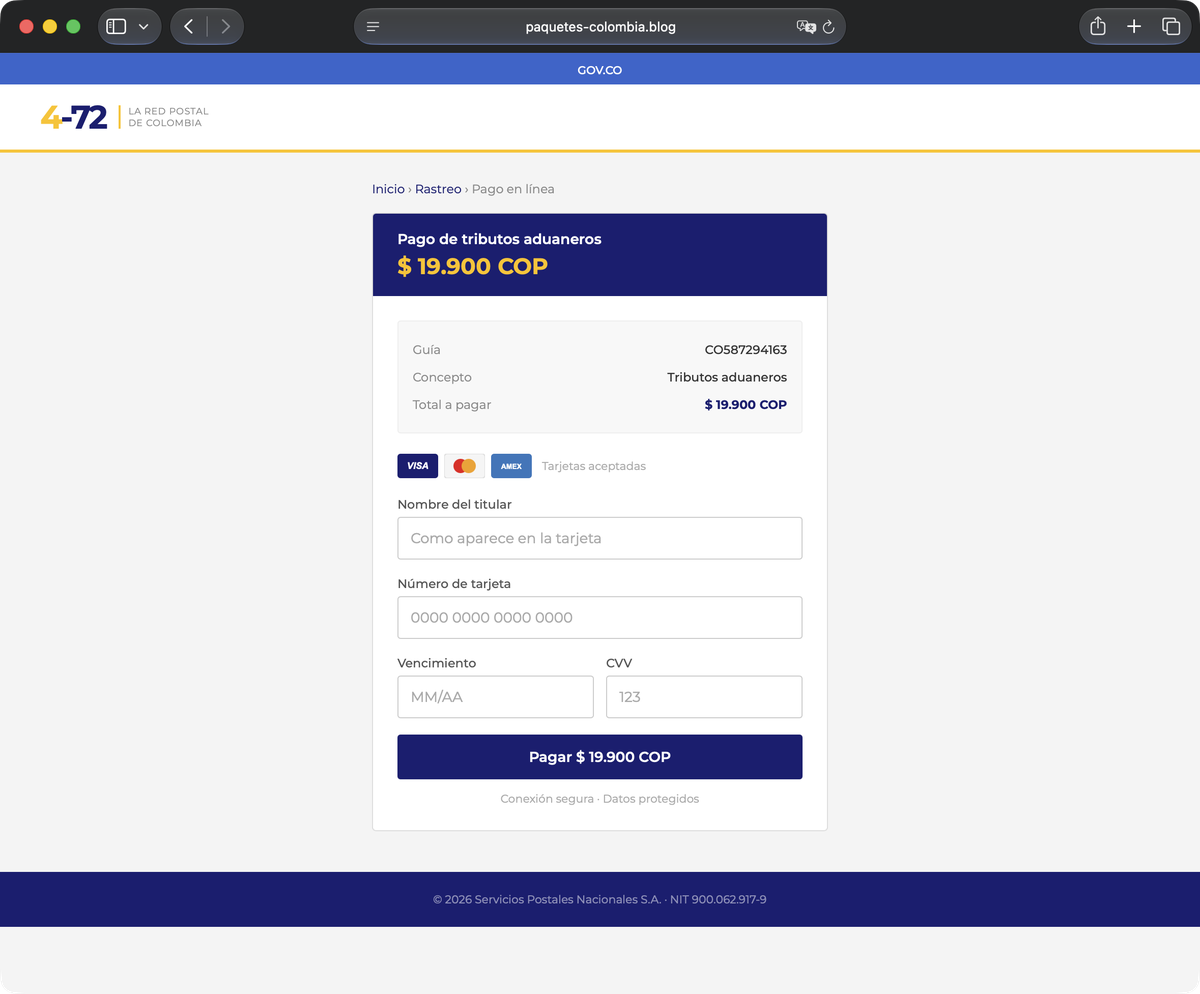 The catch is here: full card details, all at once.
So far, nothing unusual. What is strange is what happens behind it. From the moment you open this page, it asks its own server every three seconds, “Where do I send this person next?” It is waiting for a person to tell it what to do.
That is because the card number you just entered is going straight into a Telegram group, and the message the criminals receive comes with a row of buttons under it.
The six buttons on the operator’s phone
In the seconds you spend hesitating on the payment page, a phone buzzes somewhere far away: your card number appears with six buttons beneath it, and someone is choosing what to ask you for next. Like this:
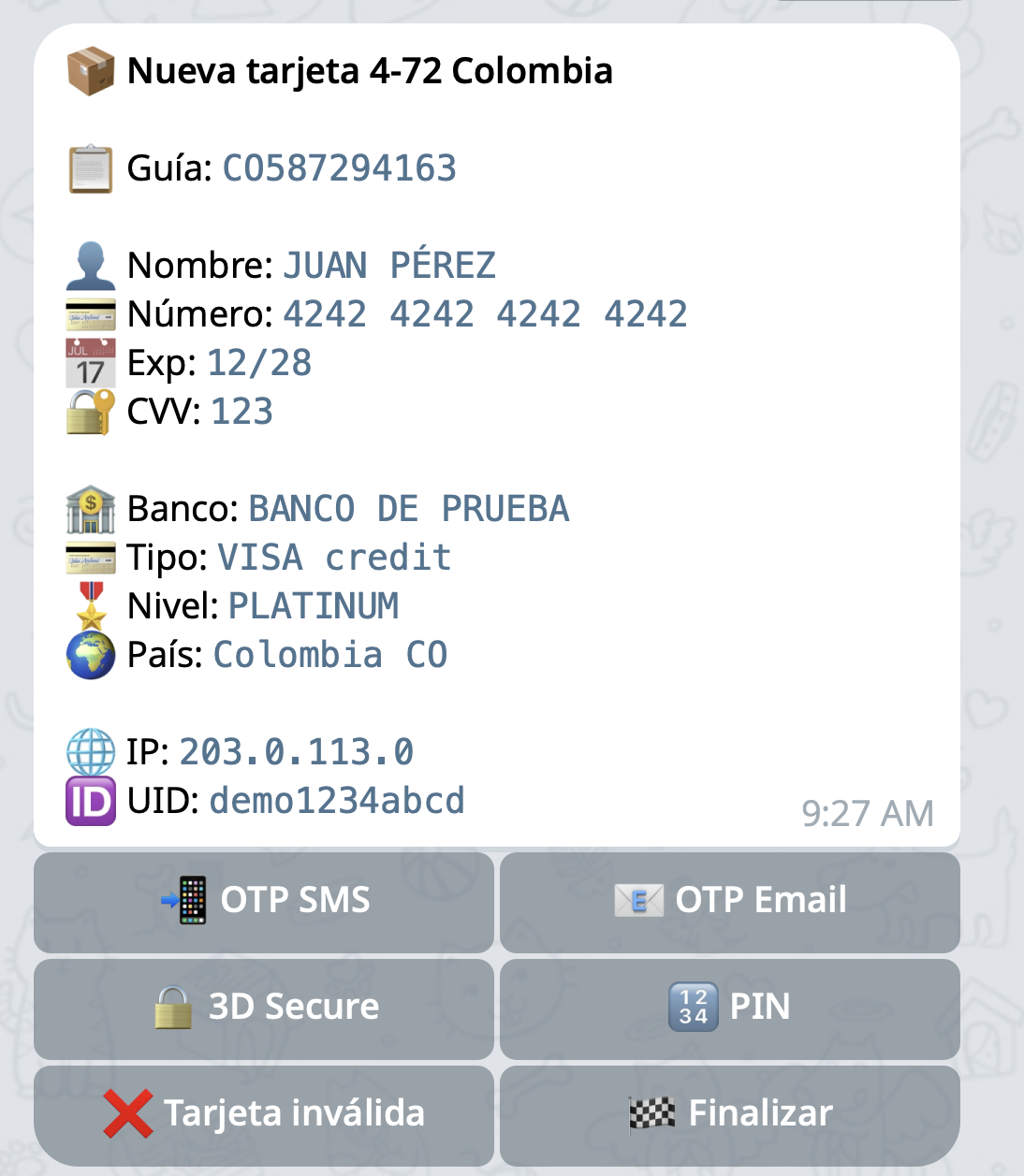 The operator’s side of the screen, with the six buttons: OTP (a one-time code) by SMS, OTP by email, 3-D Secure, PIN, invalid card, finish. This is a reconstruction I built with my own bot and placeholder data, not a captured screen.
I am not guessing at those six buttons. The site leaves its own source in plain view, in the payment page’s front-end JavaScript, which spells out exactly which buttons go into the Telegram message. Transcribed from the copy I took while the site was still up:
const keyboard = [
  [btn('📲 OTP SMS', 'redirect_sms'),  btn('📧 OTP Email', 'redirect_email')],
  [btn('🔒 3D Secure', 'redirect_vbv'), btn('🔢 PIN', 'redirect_pin')],
  [btn('❌ Tarjeta inválida','invalid_card'), btn('🏁 Finalizar','redirect_success')]
];
Each button points to cmd.php?uid=<victim-id>&cmd=<action>. These are Telegram URL buttons, not callback buttons, so pressing one opens cmd.php in the operator’s own browser. Every command they issue is a request from their own address, landing in that server’s access log. None of that is visible from outside; only whoever runs that server can see it.
Whichever button the operator presses, your browser jumps to the matching screen within three seconds.
Getting the screenshots below required no card: where those commands send a victim is written in that same block of JavaScript (only “invalid card” stays put and just shows an error), so requesting those URLs directly is enough to see the pages.
They press “OTP SMS”, and your screen shows a field waiting for the code your phone just received.
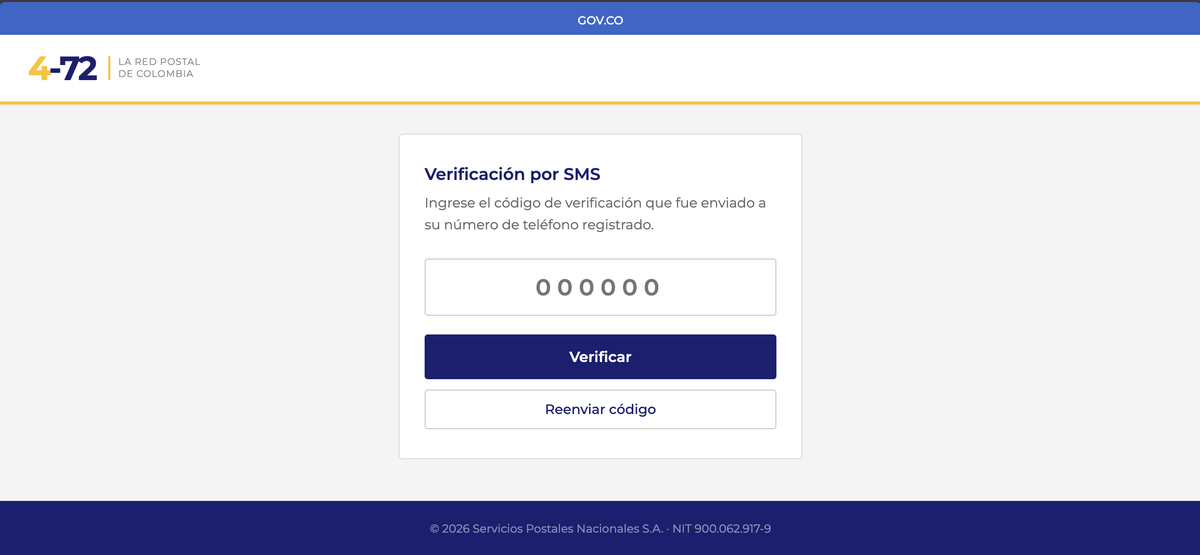 What the victim sees: a field waiting for the SMS code. The operator only has to press a button.
A press of “invalid card” tells you the number was wrong and asks you to type it again. Nastier is “3-D Secure”, the extra confirmation your bank runs on an online card payment: the screen tells you to confirm the transaction in your banking app. Nothing is stolen on this screen. Its purpose is to push you into your own bank’s app to approve the charge the operator is submitting at that moment, while you believe you are approving the customs fee.
All of it is built for one thing: they charge your card while lifting each of the bank’s confirmations off you in real time. None of the bank’s checks are broken or removed. Every one of them runs, and every one of them passes, because the cardholder is on the line supplying the answer at the exact moment it is asked for. The SMS code and 3-D Secure are designed for a thief who cannot reach you while the bank is asking. This kit’s whole job is to be reaching you at that moment.
Who is pressing the buttons
The Telegram bot’s credential (its bot token, effectively its username and password) is written into the page source in plain sight (7362…). It did not have to be: the site already has an api.php of its own taking the card details, so the send to Telegram could have happened there, on the server, with the token never leaving it. It is in your browser purely because the developer could not be bothered.
Anyone who can read the source can use it to ask the bot who it has been talking to, and I did. I used getMe and getUpdates, the calls that read without disturbing anything. Beyond that I issued no commands, never touched cmd.php (which drives a victim’s browser), and never submitted anything to the kit’s forms. I would rather not dress that up as “read-only” and leave it there: it is still authenticating to a third-party service with someone else’s credential, and whether that holds up depends on where you are. If you find a credential in someone else’s page source, the right move is to report it, not to log in.
The bot is called “KING DE L’ATLAS”, French for King of the Atlas. It belongs to two Telegram groups: one called “4-72 #1”, which gets the live “someone has just opened the site” pings; and one called “COLOMBIE” (French for Colombia), where the stolen cards are posted.
The stolen cards are posted straight into the group, but Telegram does not hand a bot’s own outgoing messages back to me. I could only see the ones an operator had quoted in a reply: six complete cards, plus one SMS code caught live. I will not reproduce them. At least six, then, with no way to infer how many people were taken in total.
Those six cards all satisfy the Luhn checksum that card numbers carry, and their leading digits fall in ranges issued by Colombian banks. I passed the card data separately, encrypted, to colCERT, Colombia’s national computer emergency response team, so they can route it to the issuers and the cardholders can be warned. Only an issuing bank can freeze a card or reverse a charge. That was never mine to do.
From the messages, at least two accounts were talking in the group, in French, and one of those account names is a word from Maghrebi Arabic. The bot is named after the Atlas, the mountain range that runs across North Africa. Together those point at a French-speaking Maghrebi context, and no further: they are clues from naming and language, not a nationality or a location. The kit’s own code comments are in French too, which matches the group, so in this case the people who built the tool and the people pressing the buttons look like the same group.
Their handles, their messages, the way they address each other: all of it was visible while I was checking, and none of it is in this post. I will name infrastructure; I will not name accounts that map to people. Partly because seeing is not proving, and if one of those accounts was itself stolen, the person named is not the person responsible. And partly because what this post is examining is the mechanism, and posting handles would only pull the focus onto catching people.
This is only #1
That group’s name, “4-72 #1”, has a number in it. People rarely number the only thing they have.
I pulled on that thread, and paquetes-colombia.blog turned out not to be the only one. A domain registered back in July, envio-colombia.blog, runs the same kit down to CO587294163, the fake tracking number pre-filled on the lookup page.
More than that: I fingerprinted it directly. It sends the cards it steals to the same Telegram bot and the same group. As each card goes out, the kit takes its first six digits to a third-party service to look up the issuing bank and the card type, and attaches that to the operators’ message. Both sites use the same key for it. So these two sites do not just share a kit, they share a back end: the front changes names, and the cards land in the same group.
envio-colombia.blog was still up at 09:36 UTC on Tuesday 18 August, still sitting behind the same challenge wall, its card page still being served. It went out in the same reports as paquetes: the registry and the registrar got it in the Sunday morning follow-up (the first report named only paquetes; I added the rest of the cluster ninety minutes later), and Cloudflare, the browser blocklists and the threat-sharing platforms followed on the 17th.
What I did
Once the link itself had been dealt with automatically, I wrote the case up and sent the report in three directions. Over the two days that followed, the fastest response came from the middle of the stack. The naming layer, the one that should act, took the long way round, and what moved it was not the door I knocked on first. The layer that could cut the whole operation in one go has not moved at all.
To make it findable. Two threat-sharing platforms: the MISP community operated by CIRCL (Luxembourg’s computer emergency response team), and abuse.ch’s ThreatFox. This does not make a site disappear. It means the next person who runs into the same infrastructure can look it up.
To make it stop. Every upstream layer that can act: Cloudflare, the registrar that sold the domain (NameSilo), the registry that runs all of .blog, the hosting provider whose machine the files actually sit on, and Telegram, whose bot the operators run this on.
To warn the people affected. The impersonated 4-72, and Colombia’s national CERT, colCERT. Those six card records went out along this path, encrypted, so the issuers can be told and the cardholders warned.
The Telegram cut is worth being precise about. Stopping the bot would not stop this site collecting cards, because the card already goes into the kit’s own api.php on the same server. What it would break is the live relay: without the notification that a card has landed, the operator cannot press any of those six buttons. And because the two fronts I fingerprinted share one bot, that single cut lands on more than one site.
The bot credential, both group IDs and both operator accounts went to Telegram at 01:11 UTC on Sunday. Fifty-six hours later, on Tuesday evening, the bot was still live and neither the groups nor the accounts had been touched. This was the one cut that would have broken the relay on both sites at once. Telegram has not replied.
Cloudflare was the quickest. I filed at 01:00 UTC on Sunday, and the interstitial was up before 04:00: the lower bound is the last time I saw the domain unactioned, 03:06, and the upper bound is Cloudflare’s own reply saying it had acted, 03:24. But a “Suspected Phishing” page is a warning, not a block: click “Ignore & Proceed” on it and the phishing page is still there. Cloudflare also found the hosting layer for me: its reply named where the site actually lives, a provider called VIRTUO. That is the one layer the challenge wall cannot blind, because it is not fetching anything from outside, the files are sitting inside its own network. In theory it is the most effective cut of all. In practice I emailed them at 04:12 UTC on Sunday and have had no reply at all.
At the naming layer I took three routes at once. The .blog registry replied that the case had been forwarded to the appropriate registrar for action, which is to say: not the registry’s problem. The registrar, NameSilo, replied from its abuse mailbox that it does not act on emailed reports and that I should use its web form instead. And NetBeacon, the mediator that exists to route a report to the party who can act on it, produced a Cloudflare ticket and no registrar response at all.
The third route was the one that worked. On Monday morning UTC I put the same evidence into that web form. At 08:53 the domain was still up, with no action recorded against it in RDAP. By 21:19 it carried client hold, server hold and pending delete, its nameservers had been stripped, and it was gone from DNS. NameSilo wrote back to say it had deactivated the domain at 01:14 PM on the 17th, in its own local time. That moment matches the registry’s record of the change to the second: twelve hours and thirty-seven minutes after I pressed submit. Its same-day sibling, post-colombia.blog, went with it.
The same evidence, to the same registrar: by email it bought a note telling me to use the form, and through the form it bought the deletion of the domain. The difference was not the evidence. It was which door it arrived at. And envio-colombia.blog is still there. One coincidence lines up, though I cannot prove it is the reason: the two that were deleted were registered on the 15th and were still inside the grace period in which a registrar can delete a registration and be refunded in full, while envio was registered back in early July, long outside it.
The genuinely opaque part is the scanner side. Several engines on VirusTotal flag this domain, and I have no way to tell whether any of those verdicts has anything to do with anything I filed: CRDF’s own documentation states plainly that it does not disclose what a verdict was based on, and the rest do not offer even that much. Eleven channels went out, and not one of them lets me confirm that those verdicts were mine.
The honest disclaimer, as always: this is one case, not a statistic. I could see inside this bot purely because this particular adversary wrote the key into a web page, and against one who keeps it server-side, this post would be half as long. The attribution is correlation, not proof. Aggregate reporting numbers are in tg.pe’s transparency report.
A phishing machine that steers a victim live, and a visible drop group where the stolen data lands: it sounds frightening, but what it earns is still that customs fee, and the card behind it. The best defence is still the old advice: when a message says a parcel is stuck and asks for a small payment, do not click the link. Open the official site or app and check the tracking number yourself.
The one thing worth carrying away is that 3-D Secure screen. When your banking app asks you to confirm a transaction, read the merchant and the amount it names, and check them against what you were actually doing. If they do not match, do not approve. And if the card number is already out, the rest is what everyone already knows: freeze the card, then read back through the last few charges.
Appendix: how tg.pe screens every link
Every submitted link passes through these gates:
- Before it goes live: the destination is checked against local blocklists and a high-risk list; its domain age is looked up, and very new domains are distrusted by default; and it is screened against Google Safe Browsing.
- After it goes live: a background VirusTotal scan restricts the link automatically once multiple engines flag it as malicious; suspicious destinations have evidence captured automatically (screenshot and redirect chain).
- Always: abuse@tg.pe takes reports from outside, and I triage them by hand; destinations confirmed malicious are reported onward to the parties that can act, as this post describes.
The design, the numbers, and the parts that do not work yet are all in the transparency report linked above.
The previous case ended more cleanly than this one: a phishing domain in use 75 minutes after it was registered, and gone from DNS by that evening, pulled by the .TOP registry. The full record of that day is in Someone used my URL shortener for phishing. The domain didn’t last eight hours..
Written by Sean Wei, who runs tg.pe. If you want the full indicators for this case and the per-layer reporting and response times, or you run a shortener yourself and want to know how this screening pipeline works in practice: security@tg.pe.